E-Learning

New - now available

Health and safety e-learning that files its own certificates

Assign courses from Safety Assistance Training to your workers, set a deadline and watch progress come in. When someone passes, Safety Mate® files the certificate and updates your competency matrix, so your training records are never a job for later.

Courses by Safety Assistance Training. Built by chartered safety professionals.

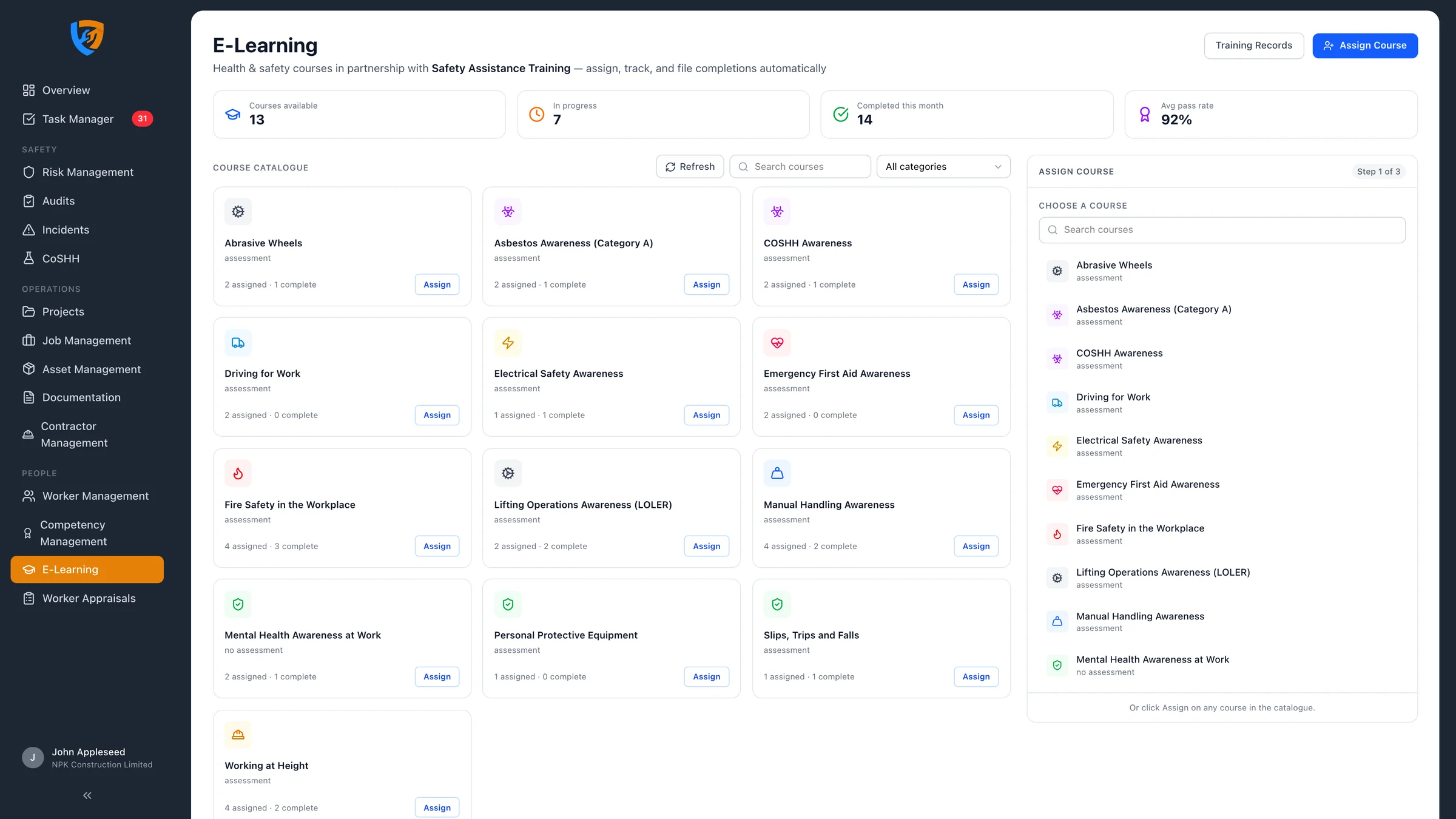
E-Learning in Safety Mate® showing the course catalogue, progress stats and the assign course panel

Why it matters

Training that doesn't stop at the course

Most e-learning ends with a certificate in someone's inbox and a spreadsheet nobody updates. Safety Mate® links each course to the competency it proves, so finishing the course updates the record that auditors, clients and your own managers check.

Courses ready to assign

A catalogue of health and safety courses from Safety Assistance Training, written by safety professionals, with assessments and pass marks built in.

  • Search and filter by category
  • Pass marks shown up front
  • New courses added automatically

Certificates file themselves

When a worker passes, the certificate is stored against them and the linked competency is added to your matrix, with its expiry date set from the course's validity.

  • No downloading or re-uploading
  • Competency matrix updated on completion
  • Renewal flagged before expiry

Nobody slips through

Every assignment has a status and a deadline. See at a glance who hasn't started, who's part-way through, who didn't pass and who's overdue.

  • Complete-by dates
  • Progress and scores
  • Overdue flagged automatically

Why health and safety e-learning?

Under section 2 of the Health and Safety at Work etc. Act 1974, employers must provide the information, instruction, training and supervision needed to keep people safe. Regulation 13 of the Management of Health and Safety at Work Regulations 1999 adds that training should be given when people start, when their work or risks change, and repeated where appropriate. HSE's guidance on competence sets out the same expectations in plain terms.

E-learning is a practical way to cover the awareness-level part of that duty. Every worker gets the same content, can fit it around shifts and site work, and is assessed against a pass mark. Practical skills still need hands-on training, but e-learning means the knowledge part is consistent, current and evidenced.

What good e-learning has to get right

  1. The right course for the role. Assign training based on the risks people face, not just a generic induction.
  2. A clear deadline. Training that can be done "whenever" tends not to get done.
  3. Proof of understanding. An assessment with a pass mark, not just a click-through.
  4. A record that stays current. The certificate filed against the person, with an expiry date that triggers a refresher.

Safety Mate® builds each of these into E-Learning, and keeps the result in the same competency matrix as the rest of your training records.

The course catalogue

Expert-built courses in one place

Browse the Safety Assistance Training catalogue inside Safety Mate®. Each course shows whether it has an assessment, how many of your people are assigned and how many have completed it.

Core health and safety topics

Courses such as manual handling, working at height, COSHH and asbestos awareness.

Live numbers at the top

Courses available, in progress, completed this month and the average pass rate.

Always up to date

New courses appear in your catalogue as soon as Safety Assistance Training publishes them.

Assign in three steps

Pick a course, pick your people, set a date

Choose a course, tick the workers who need it (or select everyone) and set a complete-by date. Before you confirm, Safety Mate® shows exactly what will happen on completion: the certificate, the competency and how long it stays valid.

No double-booking

Workers who already have the course open are marked as already assigned and skipped.

Email and task for every worker

Each worker gets an email and a Task Manager task with a Start course button.

One sign-in

Workers sign in with their Safety Mate® account, or single sign-on, and go straight into the course.

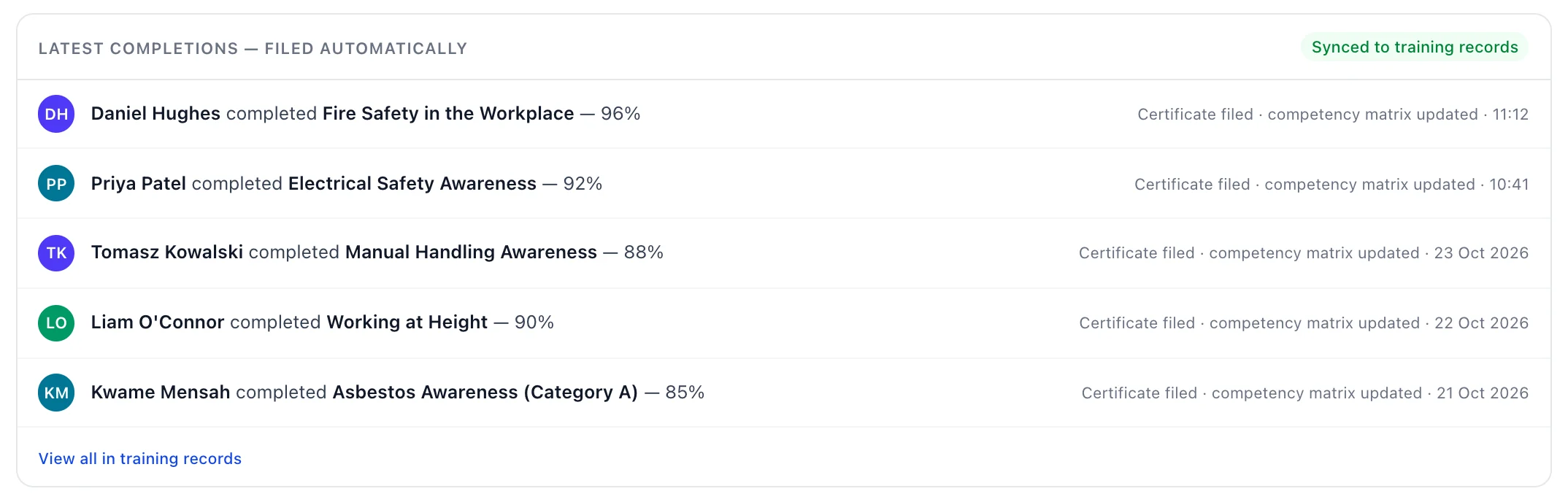
Filed automatically

Pass the course, update the matrix

Completions land in the latest completions feed with the score, and the certificate and competency are filed straight away. Open the record from Training Records to see the verified certificate in Competency Management.

Latest completions in Safety Mate® E-Learning, each with the certificate filed and the competency matrix updated

One competency matrix

E-learning and every other qualification, side by side

E-learning completions sit in the same matrix as CSCS cards, first aid certificates, plant tickets and in-house training, so you see everything a person holds, and anything missing, in one view.

Validity carried through

Each competency gets its expiry date from the course's validity period, or no expiry where it doesn't lapse.

Refreshers on time

Expiring competencies show up before they lapse, so you can assign the refresher in good time.

Ready for audits and clients

Export a worker's competency profile with their certificates whenever someone asks for proof.
Training records

Every assignment, completion and certificate

Training Records lists every e-learning assignment with its status, dates and score, whether the competency has been filed, and a link to the certificate.

Filter in seconds

Search by worker or course and filter by status: assigned, in progress, completed, not passed or overdue.

Progress you can act on

See how far through each worker is, and chase the ones close to their deadline.

Change of plan

Withdraw an enrolment if someone no longer needs the course, for example when they change role.

Everything included

E-Learning features

From choosing a course to filing the certificate, every step is covered.

Course catalogue

  • Courses from Safety Assistance Training, written by health and safety professionals
  • Search and category filters covering manual handling, working at height, hazardous substances and more
  • Course details with summary, assessment, pass mark and validity
  • Assigned and completed counts on every course
  • New courses synced daily, with a refresh button for admins

Assigning

  • Three-step assign flow: course, workers, review
  • Assign to one worker or many, with select all and search
  • Complete-by dates, or no deadline where it isn't needed
  • Already-assigned workers skipped automatically
  • Preview of the outcome: certificate, competency and validity before you confirm

For workers

  • Course email with a link to start, which workers can mute in their notification settings
  • Task Manager task with a Start or Continue course button
  • Sign in once with a Safety Mate® account or single sign-on, with MFA where enabled
  • Secure, single-use course links, checked against the assigned worker
  • Clear messages if a course isn't theirs or is still being set up

Assessment and progress

  • Assessments with pass marks set per course
  • Progress percentage while a course is under way
  • Scores recorded against each completion
  • Not passed status so you can follow up
  • Overdue flag once the complete-by date passes

Certificates and competencies

  • Certificate stored in Safety Mate®, not left on the training site
  • Competency added or renewed in the matrix on completion
  • Expiry set from the course validity, or no expiry
  • Link existing competencies to courses in one click
  • Open the certificate in Competency Management from any record

Records and oversight

  • Summary stats: courses available, in progress, completed this month and average pass rate
  • Latest completions feed showing what was filed
  • Training Records with search and status, course and worker filters
  • Withdraw enrolments that are no longer needed
  • Permissions so only admins and managers assign courses

How it works

From assignment to certificate

1

Assign

Choose a course, select your workers and set a complete-by date.

2

Workers learn

They open the course from their email or task list and sign in with their Safety Mate® account.

3

Assess

Each course ends with an assessment, and progress and scores sync back as they go.

4

Filed automatically

A pass files the certificate and updates the competency matrix, with a renewal date where needed.

FAQ

Health and safety e-learning FAQs

Who provides the e-learning courses?

Safety Mate® partners with Safety Assistance Training, which writes and hosts the courses. They cover core health and safety topics such as manual handling, working at height, COSHH and asbestos awareness, and new courses appear in your catalogue as they're published.

Do workers need a separate login for the courses?

No. Each worker gets an email and a task with a link to their course. They sign in with their normal Safety Mate® account, including single sign-on where your organisation uses it, and the course opens. There's no second username or password to remember.

What happens when a worker completes a course?

Safety Mate® picks up the result, files the certificate against the worker and adds or renews the linked competency in your competency matrix, with an expiry date where the course has a validity period. The training record shows the completion date, score and a link to the certificate.

Can I set deadlines and see who is behind?

Yes. Choose a complete-by date when you assign a course. Training records show every assignment as assigned, in progress, completed, not passed or overdue, with progress and scores, and you can filter by status, course or worker.

Does e-learning replace practical training?

No. E-learning is a good fit for awareness-level knowledge and refreshers. Tasks that need hands-on skill, such as operating plant, using a harness or first aid, still need practical training and assessment. Safety Mate® records those in the same competency matrix, so you see the full picture for each person.

Who can use E-Learning?

E-Learning is available to UK organisations on Safety Mate® Pro and Enterprise plans. Admins and managers assign courses; workers only see their own courses. Your proposal reflects the courses and number of learners you need - book a demo and we'll talk it through.

Train your people and prove it, in one place

E-Learning is now live in Safety Mate®. Book a demo to see the course catalogue and how completions flow into your competency matrix, and receive a tailored proposal.